Microsoft · Security Blog
Storm-2372 conducts device code phishing campaign — timeline, TTPs, and Conditional Access mitigation guidance


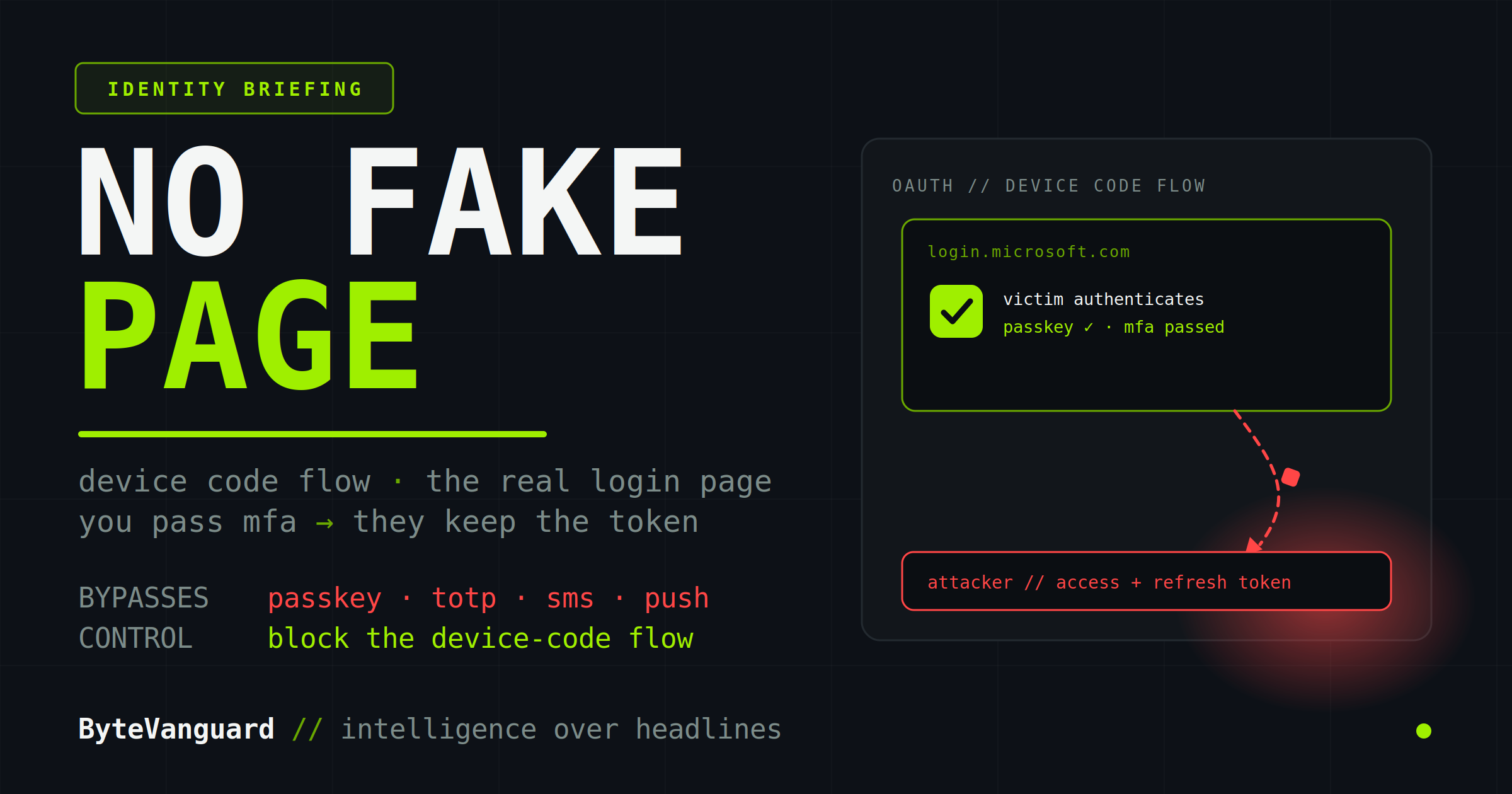
You can roll out FIDO2 keys to every employee, kill every legacy protocol, and pass every audit — and an attacker can still walk into your Microsoft 365 tenant without stealing a password, intercepting a code, or standing up a single fake login page. Device code phishing doesn’t break your MFA. It waits, politely, for you to complete it.
Most identity advice in 2026 converges on one instruction: deploy phishing-resistant MFA. It is good advice. Passkeys and FIDO2 keys genuinely close the door on the attack that has dominated the last two years — adversary-in-the-middle phishing, where a reverse proxy relays a real login through a fake page to steal the session. But there is a second technique the “just use passkeys” guidance does not cover, and it is moving from nation-state tradecraft into commodity crime faster than almost anything else in the identity space. It abuses an authentication flow you are probably not using, and almost certainly not watching.
The OAuth 2.0 device authorization grant, standardized as RFC 8628, exists for a sensible reason. Some devices cannot present a usable login form: smart TVs, IoT appliances, command-line tools, and conference-room phones have no keyboard or no browser worth using. So the device displays a short code, and you complete the sign-in elsewhere — on your phone or laptop, at a normal Microsoft page — and the device receives its tokens once you approve. It is convenient, widely supported, and entirely legitimate.
Device code phishing changes nothing about that flow. It does not exploit a bug, corrupt the protocol, or tamper with the sign-in page. It changes one thing only: who started the request. Instead of a smart TV in your living room asking for the code, it is an attacker’s server. The rest of the dance proceeds exactly as Microsoft designed it.
Here is the sequence, and it is worth reading slowly, because the danger lives in how ordinary each step is.
Notice what never happened. No password was stolen. No one-time code was intercepted. No fake login page was built, and no look-alike domain was registered. The only domain in the entire chain is Microsoft’s own. This is the part that breaks the standard mental model of MFA: a second factor exists to prove the right person is signing in — and here, the right person is signing in. The attacker does not need to defeat the factor. They need the human to finish it on their behalf.
It is also why this cannot be patched away. As Silverfort puts it plainly, this is a design property of the OAuth 2.0 device code protocol — supported by every major identity provider — not a flaw in any one vendor’s code. Microsoft can harden its implementation and add friction, but the flow is doing exactly what the standard says it should. And because there is no fake page, no payload, and no suspicious infrastructure, the signals your email gateway, EDR, and identity-protection tooling are trained to catch all come back clean.
“MFA exists to prove the right person is signing in. Here, the right person is signing in — on the attacker’s behalf.”
It is tempting to file this alongside AiTM phishing, the reverse-proxy technique we covered in Browser-in-the-Middle: The Phishing Technique That Bypasses MFA. They are cousins, but the difference is the whole point. AiTM stands a fake login page in front of the real one and relays the session through it; phishing-resistant MFA defeats it because a passkey’s signature is cryptographically bound to the legitimate origin, and the attacker’s proxy domain is not that origin — so the browser refuses to sign, and the proxy is left with nothing.
Device code phishing has no proxy and no fake domain to fail that check against. The victim authenticates on the real Microsoft page, the origin is genuine, and the passkey signs happily. There is no AiTM infrastructure to detect, block, or take down — nothing to report to a registrar, nothing to add to a blocklist. The attack’s entire footprint is a code in a message and a token issued by Microsoft.
A caveat on the disagreement: some vendors state flatly that phishing-resistant MFA stops device code phishing. That reading conflates it with AiTM. The technically accurate position — held by Microsoft, Silverfort, WorkOS, and others — is that passkeys do not cover this variant, because authentication happens on the legitimate endpoint and the user grants access willingly. Treat “passkeys solve it” as the claim to verify, not assume.
The technique is not new. It was documented around 2020, with early tooling like Secureworks’ PhishInSuits and SquarePhish — the latter using a QR code to race the fifteen-minute window before a device code expires. Researcher Dirk-jan Mollema later showed how a device code could be chained into a Primary Refresh Token for browser-level access. For years it stayed niche, the preserve of red teams and a few advanced actors. Then it industrialized.
What was espionage-grade tradecraft eighteen months ago is now something a low-skilled operator can rent. The defenders facing it have not changed; the volume and automation aiming at them have.
Because the attack rides a legitimate flow, the control that maps to it is also about the flow — not the factor. In order of impact:
Microsoft’s primary recommendation. Use the Authentication Flows condition to block device code flow for everyone without a documented need — most knowledge workers and most developers. Deploy report-only first; check whether a Microsoft-managed policy is already in place under the Secure Future Initiative.
Allow-list by approved users, operating systems, or named locations, and reserve it for genuine cases — Teams Rooms, onboarding, developer PowerShell. Better still, require a compliant or registered device, so a code completed from an unmanaged machine fails.
Token protection and device-bound sessions, short session lifetimes, and Continuous Access Evaluation so a change in risk revokes tokens in near real time rather than waiting for them to expire.
Device-code grants from unexpected IPs or geographies, sign-ins tied to the Microsoft Authentication Broker client ID, and new device registrations minutes after a suspicious sign-in. Each field looks clean alone; the sequence is the story.
And give users the one rule that actually matters: a legitimate device code prompt comes from a device you are actively setting up — never from an email, a Teams chat, or a message asking you to “enter this code” somewhere. If you did not start it, do not finish it.
Device code phishing is a useful reminder that MFA strength and identity security are not the same thing. You can do everything right at the factor layer — passkeys everywhere, no legacy authentication, a clean audit — and still hand an attacker a live session, because this technique never touches the factor. It abuses a flow you probably are not using and likely are not monitoring.
Sourcing: timeline, attribution, and mitigation guidance are drawn primarily from Microsoft’s Storm-2372 and AI-enabled device-code reporting and Microsoft Learn’s Conditional Access documentation, with corroborating detail from Push Security, Silverfort, Proofpoint (via Help Net Security), and SpyCloud. Storm-2372’s alignment with Russian state interests is a Microsoft assessment held with moderate confidence. The device code flow is defined in RFC 8628; the technique is an abuse of that standard, not a patchable vulnerability in any single product.
If you find ByteVanguard useful, you can support the site and help keep the analysis independent.
Support the analysis